Does Container Network will Effect Gameserver
As I posted previously starting game server is easy but there is concern when I make as container which is how to handle Networking and Storage.
Initially I thought each container can run the same port like 27015 and then I can bind it to host port with different number of port - Steam Game default port is 27015. But I facing issue where I can’t create lobby inside the server, I can see the server listing on steam groups but the server won’t create and showing error “Can’t Create lobby”.
My guess is the Steam Master Server saw my client which hosting the game server and see the same IP Public and Port then decide “you can’t have same port with the same IP” and then reject user creating lobby from the said server, I guess is the classic you can’t have two application listening on the same port of the host in this case Steam see my IP Public and Port where the game running:

The work around is using different port when starting the game so you can have survival server running in port 27015 and then versus server in port 27016 so the game server doesn’t have conflicting port but I don’t know what is the maximum number port you can have in single instance.
Speaking of Application, my Steam friend asking me what jobs IT I did and after few exchanges about running the game server inside the container he arise some concern regarding networking performance:

I think is valid concern and the answer is doesn’t matter because container is virtualization like Virtual Machine but unlike Virtual Machine where it simulate all the hardware and OS for running software Container is groups of process isolated with cgroup and namespace that give container ability for networking and storage that why it feels like VM.
That’s the reason why networking performance I think is on par with VM, also Container support UDP protocol that’s use for game server so that’s another reason why I use container to serve game server since is the way to go to have multiple game server in one VPS and is cheaper than having multiple VPS unless you need support for other region.
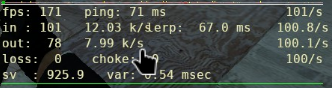
I have been testing it with my friends and it can handle Campaign and Survival Mode, I don’t see any lag or drop of performance. Heck I even modify one of the game server to have 100 tick rate to see if it can handle it.
I will write about storage related topics in separate blog and make tutorial how to deploy it yourself in your own hardware.